Most paystubs show one line for overtime: hours, rate, and a total. The deduction needs only the premium inside that total. Here is how to pull it out, whichever way your stub is laid out.
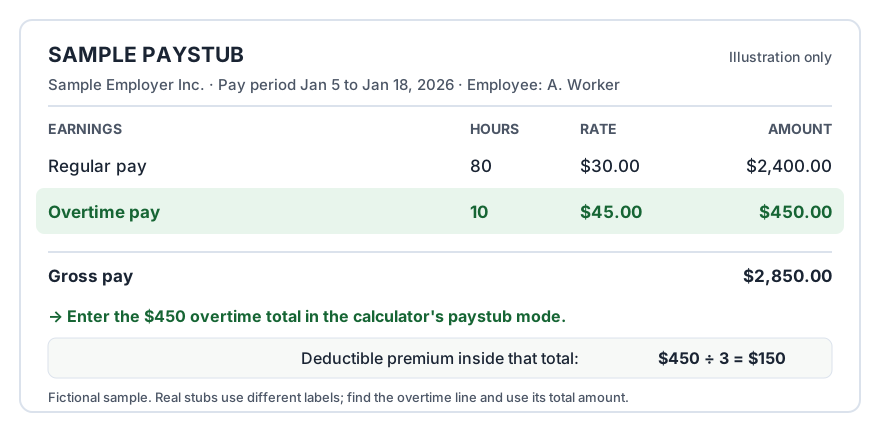
Anatomy of a paystub overtime line. Your stub’s labels will differ; the total on the overtime line is the number that matters.
If the stub shows a separate premium line
Some payroll systems print the premium as its own line, sometimes labelled “OT premium” at half your regular rate. That line is your figure. Add those lines across the year and you have the qualified premium, subject to the cap and phase-out in the overtime calculator.
If the stub shows one total at time and a half
A time-and-a-half total is three parts: two parts regular rate and one part premium. So the premium is the total divided by 3. A stub total of $9,000 for overtime paid at 1.5x contains $3,000 of premium. This is the single most useful check on this page, and it is also how you sanity-check a W-2 code TT figure later.
If the stub shows one total at double time
A double-time total is two parts regular rate and two parts premium, but only the FLSA-required premium qualifies: one part in four of the total. So the qualifying part is the total divided by 4. A $12,000 double-time total contains $3,000 of qualified premium, not $6,000.
Mixed rates and blended stubs
If your stub mixes time-and-a-half and double-time hours, split the totals by rate type first, then apply divide by 3 and divide by 4 to each part. If your rate changed during the year, work period by period. It is arithmetic, not estimation: every stub total is built from a rate and hours.
Which year are you working out?
For tax year 2025, this paystub method was an IRS-approved route: Notice 2025-69 let employees establish qualified overtime from paystubs and other reasonable records because employers were not required to report it separately that year. From 2026, employers must report the premium in W-2 Box 12 code TT, and the reported figure becomes the basis of the claim. Keep your stubs either way: they are how you check the W-2, and the reconciliation tool shows what each mismatch means.